How do I verify my bank account?

Copied to clipboard

Before completing a withdrawal, we may ask you to confirm you are the owner of the bank account. Bank account verification (available only via a web browser) is simple and easy.

Add a bank account if you haven’t done so in the past. If you have already registered a bank account: 

  1. From the Withdraw page select Bank Account.
  2. Choose the bank account you wish to use from the ones already registered.
  3. You may be prompted to upload a bank statement to complete the verification.
Bank withdrawal screen with a centered modal titled “Bank Verification required.” The message asks the user to verify bank details by uploading a copy of a bank statement. A purple “Verify bank account” button appears below, with a close icon in the upper-right corner. The dimmed background shows a withdrawal to ABC International Bank ending in 606, an amount of 11.76 BGN, processing and fee details, and “Back” and “Confirm” buttons.
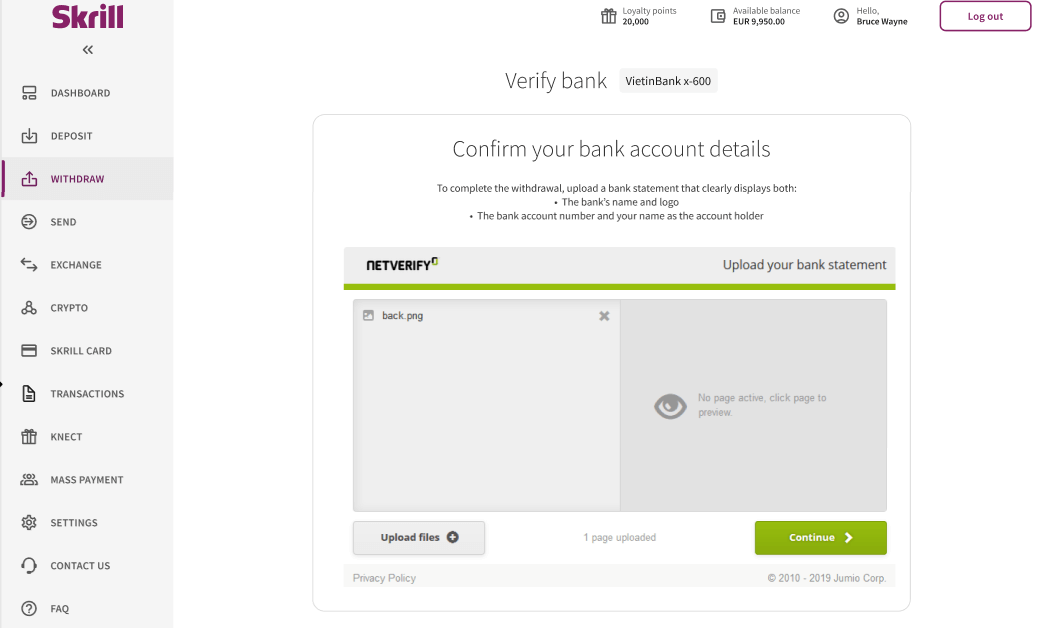
Skrill “Verify bank” page for VietinBank ending in 600. The page asks the user to confirm bank account details by uploading a bank statement that clearly displays the bank’s name and logo, the bank account number, and the account holder’s name. A Netverify upload panel shows one uploaded file named “back.png,” an empty preview area, an “Upload files” button, and a green “Continue” button. The left navigation menu lists Dashboard, Deposit, Withdraw, Send, Exchange, Crypto, Skrill Card, Transactions, Knect, Mass Payment, Settings, Contact Us, and FAQ, with Withdraw selected. The header displays 20,000 loyalty points, an available balance of EUR 9,950.00, a user greeting, and a “Log out” button.
Bank verification confirmation page for ABC International Bank plc account ending in 606. A document icon appears above the message, “We received your bank statement.” Supporting text states that the statement will be reviewed within 24 hours and that a confirmation email will be sent. A purple “Go to dashboard” button is centered below.

The standard document processing time is 24h. You will not be able to complete a withdrawal while the document review is pending.

Withdrawal page prompting the user to select a bank account. ABC International Bank plc account ending in 606 is selected with a turquoise checkmark and labeled “Verification in progress.” Options to delete the account or add another bank account are shown. A bordered “Back” button is active, while the “Next” button is disabled.

Click to enlarge.

We will inform you when your document has been successfully uploaded. Once your bank account is verified, you will be notified via e-mail.

Make sure that:

  • the uploaded bank statement has been issued within the last 90 days
  • the name of your Skrill account matches the name on the bank statement (third party bank accounts and business accounts are not accepted)
  • all the information on the uploaded documents is clear and legible

Related articles

Back to top